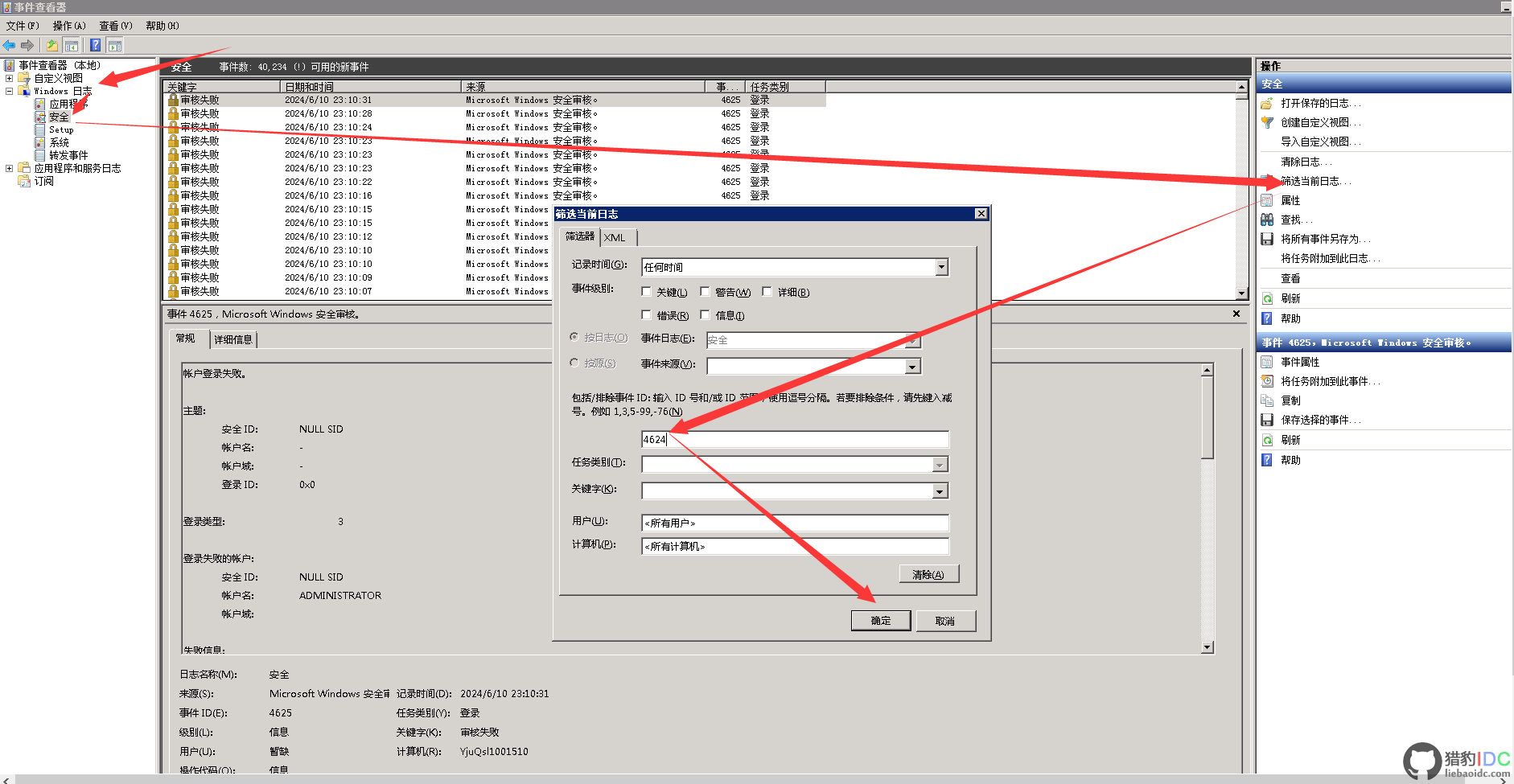
I. If you want to filter system user login successes using the number 4624 (which is usually an event ID in Windows Event Viewer indicating that an account has successfully logged in), you would typically do this in Windows Event Viewer.

Here are the steps on how to filter event ID 4624 in Windows Event Viewer:
-
Open Event Viewer:
- Click the bottom right corner of the desktop. Start > Run, or press Win + R to open the Run dialog box. Type eventvwr.msc and press Enter. Navigate to Windows Logs:
- Click "Security".
- Filter Events:
- At the top of the right pane, you should see a "Filter current log..." link. Click it.
- In the pop-up dialog box, go to the "Event ID" section.
- Enter 4624 in the "Event ID" box.
- Click "OK".
Now, you should only see events related to Event ID 4624 (i.e., the successful login event).-
View and analyze events:
- You can view detailed information for each event, including the logged-in user, login type, login source, etc.
- Filter Events:
- In the left pane of Event Viewer, expand "Windows Logs".
II. In Windows systems, security event IDs are important identifiers used to track and record system security-related activities.In Windows systems, security event IDs are important identifiers used to track and record system security-related activities.
The following is a summary of Windows security event IDs, categorized and explained according to different types:
User Account Related Events
- 4624: Successful login event, indicating that the user successfully logged into the system.
- 4625: Login failure event, indicating that the user attempted but failed to log into the system.
- 4720: User creation event, indicating that a new user account has been created.
- 4722: Enable User Account event, indicating that a disabled user account has been enabled.
- 4723: Change User Password event, indicating that the user password has been changed.
- 4738: Set User Password event, indicating that the user password has been changed or reset (note that it is similar to event 4723, but there may be different triggering conditions).
- 4740: User Account Locked, indicating that the user account has been locked due to multiple failed login attempts or other reasons.
User Group Related Events
- 4731: A local group with security enabled has been created.
- 4732: A member has been added to a local group with security enabled.
- 4733: A member has been removed from a local group with security enabled.
- 4734: A local group with security enabled has been deleted.
- 4735: The local group with security enabled has been changed.
- 4737: The global group with security enabled has been changed.
Computer Account Related Events
- 4741: A computer account has been created.
- 4742: The computer account has been changed.
- 4743: The computer account has been deleted.
Security Group Related Events
- 4724: A security group has been created, indicating that a new security group has been created.
- 4754: A general group with security enabled has been created.
- 4755: The general group with security enabled has been changed.
Security Settings Related Events
- 4739: Domain policy has been changed, indicating that the domain's security policy has been changed.
- 4764: Group type has been changed, indicating that the type of user group (such as local group, global group, general group) has been changed.
Other Security Events
- 1100: Event logging service is disabled.
- 1101: The audit event has been interrupted during transport.
- 1102: The audit log has been cleared.
- 1104: The security log is now full.

Related articles
Pre sales consultation